




 | Find us on Google+
©2004 Marketing for Profits
Ltd - T/A MfP Website Marketing, Top Floor, 33 Southbourne Grove, Bournemouth, BH6 3QT,
UK.
Reg in England, number 3598244
 Tel: 01202-257423 Fax:
01202-257423 e-mail:
Tel: 01202-257423 Fax:
01202-257423 e-mail:
MfP
Website Marketing Services - based in Bournemouth, serving Poole & Christchurch, Dorset and Hampshire
Creating an Email Template
Email templates are a useful way of advertising your business, while providing a professional image to your email.
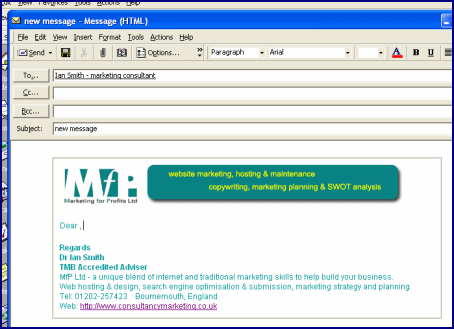
For example every time you come to send a new email in Microsoft Outlook, this is the sort of screen that you can have appear. The header and the footer are already in place and all you need to do is type in your message.
Background Information
Outlook offers you the opportunity to use a variety of "templates" already installed with the program. You can see the options available by going to "Actions/New Mail Message using/More stationery...." (see below)
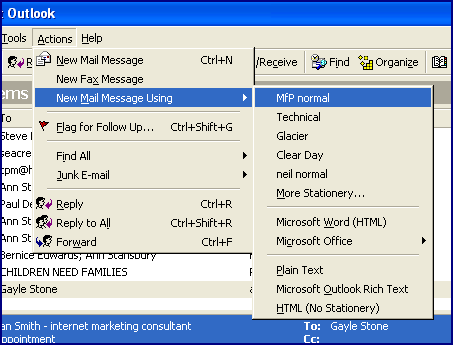
Obviously none of these basic templates are suitable for your business, but once you have finished this tutorial, your own template will be included in this list. Outlook does offer the option to create Templates in "Tools/Options/Mail Format/Stationery Picker/New", but this option is very limited, and quite frankly not much use.
Before you start designing your template it is vital to know where on your hard drive Outlook stores these files. They can be found at C:\Program Files\Common Files\Microsoft Shared\Stationery.
Creating your Template
You will need to be able to create an HTML page using an HTML editor such as DreamWeaver or any other software you may have. Assuming you are not familiar with HTML, we suggest you try searching Google for a free "HTML Editor" download, and then use the sample template below to create your personalised template.
In order to access the sample template you need to download the zip file above onto your hard drive and unzip the files into C:\Program Files\Common Files\Microsoft Shared\Stationery.You will notice two files will be added, namely "My Template.htm" and "email-banner.gif". If you now go back into Microsoft Outlook and compose a new email message using "More Stationery" you will see an additional template availabel for use called "My Template".
All that now needs to be done is to modify this HTML page and gif image with your own company information/logo etc.
We offer this quick guide to those small businesses happy to tackle this project themselves, but do bear in mind that creating email templates is a service we offer, so please get in touch if you would like us to create your template for you.